Karnage Clicker
Karnage Clicker: Complete Game Guide
Learn how to mine gems, recruit characters, upgrade production and compete for weekly prizes in Karnage Clicker.
Karnage Clicker Overview
Karnage Clicker is a seasonal mining game set in the Kingdom Karnage universe. Tap the crystal for active income, recruit characters to generate gems automatically, then improve both sides of your production through upgrades.
Your blue gem total is both your spending resource and your current leaderboard score. Spending gems helps you produce faster, so successful play is about reinvesting early and building the strongest possible production rate before the season ends.
Getting Started
- Open Mine and tap the large crystal repeatedly to complete mining cycles.
- Spend your first gems in Recruit to hire a Warrior and begin automatic production.
- Return to Mine while your recruits continue collecting in the background.
- Use Upgrades to improve active mining and the recruits you already own.
- Complete available adverts or offers to build a lasting production boost and progress towards weekly prize qualification.
- Check Prizes to follow your rank, remaining season time, qualification progress and the previous season's results.
Active Mining and Clicks
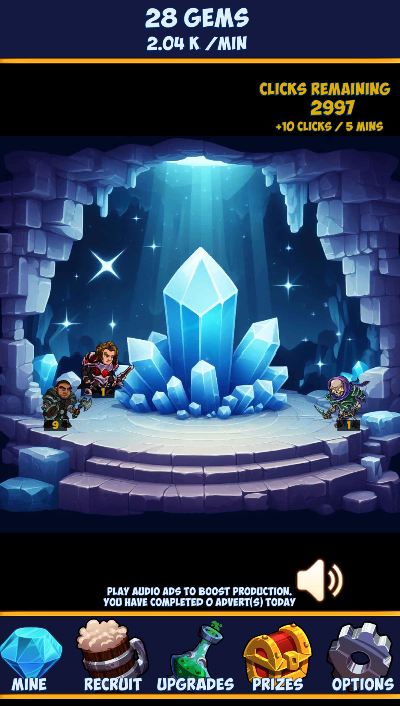
Tap the crystal until the charge indicator completes. A completed mining cycle consumes one available click and awards the amount shown by your per-click value. Hammers increase the gems earned from each completed cycle.
- You begin with a small supply of available clicks.
- 10 clicks are restored every five minutes.
- Stored clicks are capped at 3,000, so an account left idle indefinitely will eventually stop accumulating more.
- Running out of clicks pauses active mining, but your recruited characters continue generating their normal gems per minute.
The count in the top-right of the Mine screen shows how many completed mining cycles remain. You do not need to wait for a full click supply before playing; spend them whenever active mining is useful.
Recruiting Characters
Recruits generate gems automatically once per minute. Later characters cost much more but provide substantially higher base production.
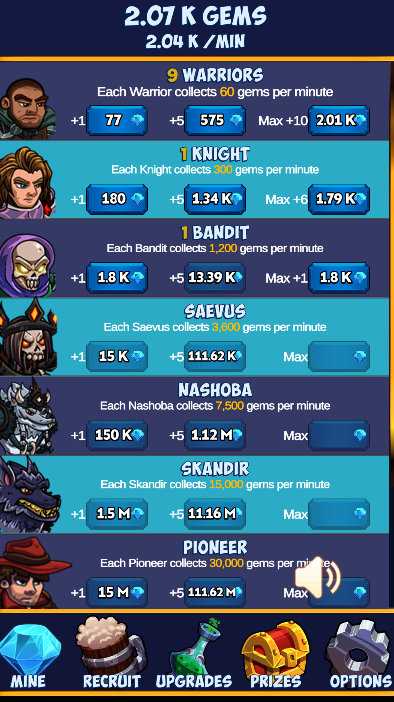
| Recruit | Base gems per minute |
|---|---|
| Warrior | 60 |
| Knight | 300 |
| Bandit | 1,200 |
| Saevus | 3,600 |
| Nashoba | 7,500 |
| Skandir | 15,000 |
| Pioneer | 30,000 |
| Wyden | 60,000 |
| Lilith | 240,000 |
Each additional copy costs more than the last. The three purchase buttons let you buy +1, +5, or the maximum quantity currently affordable. The Max button is useful later in a season, but check whether unlocking the next recruit or buying an upgrade would improve production more efficiently.
Production Upgrades
The Upgrades screen separates active-mining improvements from recruit improvements:
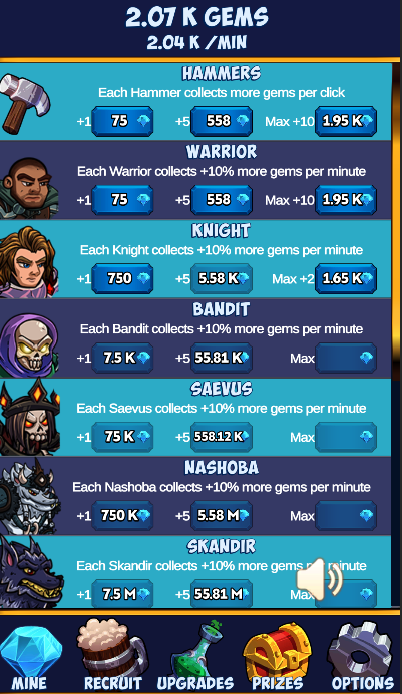
- Hammers add more gems to every completed mining cycle. The starting value is 10 gems per cycle and each Hammer adds another 4.
- Character upgrades add 10% of that character's base production per upgrade level.
- A character's production upgrade becomes useful after you own that recruit.
- The +1, +5 and Max controls work in the same way as the Recruit screen, with costs increasing as more levels are purchased.
Character bonuses are additive for that recruit. For example, one Warrior produces 60 gems per minute before upgrades; one Warrior upgrade adds 10% of that base output for every Warrior you own.
You may also see an account-linked Dragons bonus in the upgrade list. Use the percentage displayed in the live game, as the eligible power and resulting boost are read from your current Kepithor account.
Adverts, Offers and the Bounty Boost
Completed adverts improve your total automatic production for the rest of the current season:
- Each accepted audio advert adds 0.2% to total recruit production.
- Each accepted video advert adds 0.8% to total recruit production.
- The combined percentage is displayed as the Bounty or advert production boost on the Upgrades screen.
Only a successfully completed and server-accepted advert counts. Allow the reward to finish crediting before starting another. Daily availability depends on the providers and live game configuration, so use the counters and messages shown in the app rather than an old published limit.
The Offer button opens the current offerwall. Credited offers can boost mining production and contribute towards the weekly advert requirement. Follow the instructions and eligibility terms shown for each offer, as rewards vary.
Weekly Seasons, Rankings and Prizes
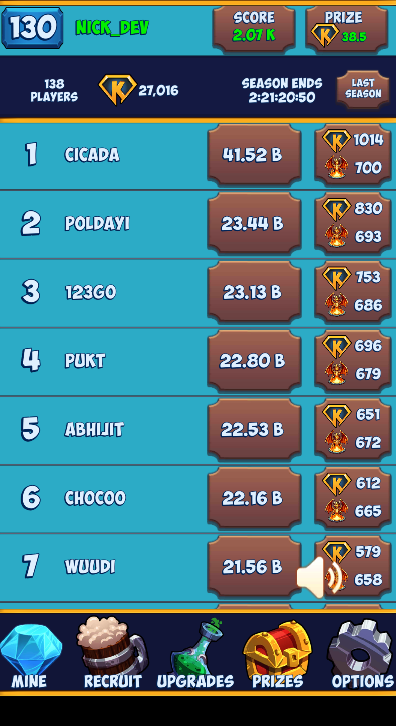
Seasons currently finish each Friday at 12:00 UTC, with the next season beginning shortly afterwards. Always use the countdown on the Prizes screen as the authoritative deadline.
At the start of a new season, the competitive mining progress resets. This includes your blue gems, recruits, mining upgrades, character upgrades, clicks and seasonal advert boost. Everyone then builds again from the starting position.
How Ranking Works
Your leaderboard score is your current blue gem total. Players are ordered by that score, and the Prizes screen shows the time remaining, current rank, projected reward and previous-season results.
Qualifying for a Ranked Prize
You must complete 20 qualifying adverts or credited offer activities during the season to receive a ranked prize. The qualification panel shows your current progress. A high leaderboard position without completing the requirement does not qualify for payment.
Prize quantities, winner counts and values are controlled by the live season. Depending on position, the game may display KEPI and Dragon Essence rewards. Treat the amounts shown in the current Prizes screen as authoritative rather than relying on figures copied from an older season.
Useful Strategy
- Recruit early. Automatic income has more time to work when purchased near the beginning of the season.
- Keep reinvesting. Hoarding gems preserves score temporarily, but efficient recruits and upgrades can produce a much larger score before the deadline.
- Compare the next recruit with existing upgrades. A cheaper 10% boost across several owned characters can sometimes outperform saving for a new tier.
- Use active mining while clicks are available. Letting the click bank sit at its cap wastes future five-minute refills.
- Build advert qualification steadily. Do not leave all 20 qualifying activities until the final hours of the season, when advert inventory may be limited.
- Check the countdown in UTC. Seasonal progress resets at the deadline, so make final purchases and qualification checks before it reaches zero.