Great British Raffle
Great British Raffle: Complete Game Guide
Learn how to earn raffle tickets, improve your chances in the daily draw, check results and redeem prizes in the Great British Raffle.
Great British Raffle Overview
Great British Raffle is a free raffle game from Kepithor Studios. Watch video adverts or listen to audio adverts to collect tickets, enter the daily draw and check whether you have won a cash prize.
More tickets improve your chance of winning, but do not guarantee a prize. Tickets are entries for the next draw, not cash, and they do not carry over after the daily reset.
Getting Started
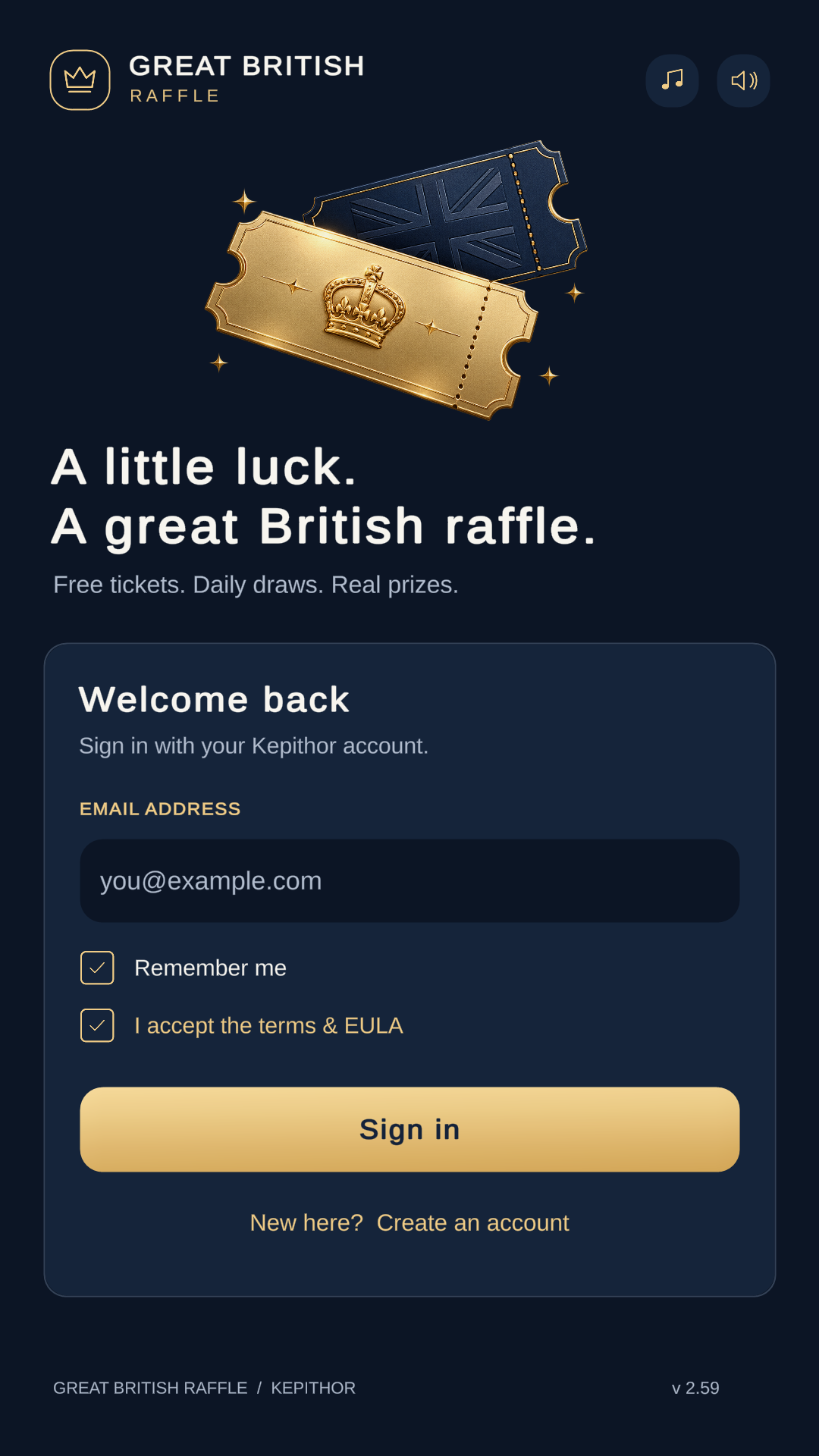
- Sign in or create an account. Read the terms and raffle rules before taking part.
- Collect tickets from the home screen. Choose an available video or audio advert and let it finish.
- Wait for your tickets to be confirmed. Check the updated total under Your Tickets.
- Collect before the countdown ends. Your tickets enter the next daily draw automatically.
- Open Draw Results after the draw. Winning prizes are added to your balance.
- Use Cash Out when your balance reaches the withdrawal requirement.
Understanding the Home Screen
The home screen brings your entries, draw countdown, winnings and advert controls together:
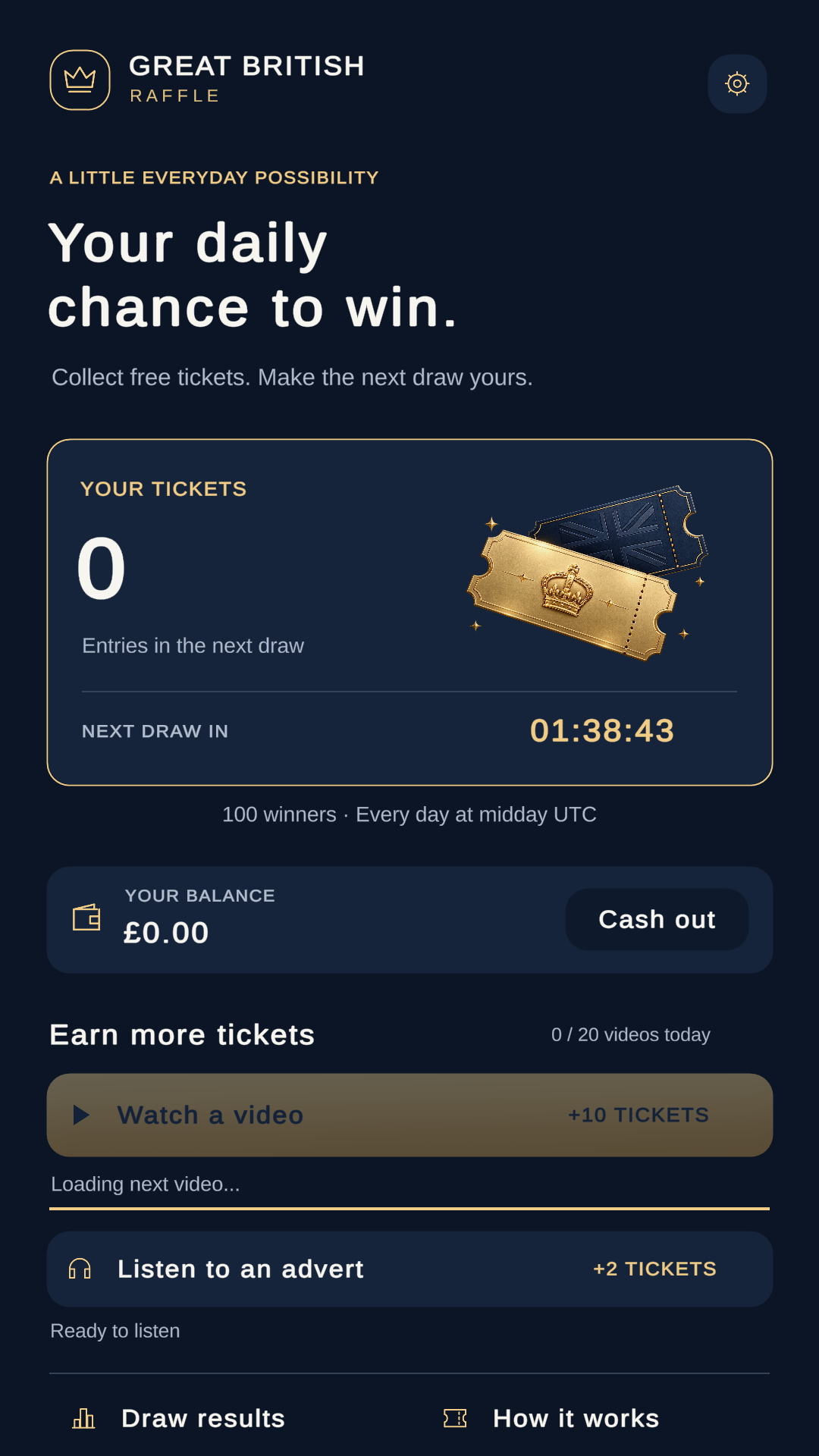
- Your Tickets: your entries for the next draw.
- Next Draw In: the countdown to midday UTC.
- Winners: the daily winner count shown below the ticket panel.
- Your Balance: accumulated winnings, shown in pounds (£), with a Cash Out button alongside.
- Earn More Tickets: video and audio advert buttons, availability messages and today's video progress.
- Draw Results: the latest published winners.
- How It Works: a quick explanation of the raffle.
- Settings: the cog in the top-right opens music, sound and payout settings.
Earning Raffle Tickets
Complete adverts using the buttons under Earn More Tickets:
- Watch a video: a completed, credited video awards 10 tickets.
- Listen to an advert: a completed, credited audio advert awards 2 tickets.
Let the advert finish and wait for your ticket total to update. A Confirming your earned tickets… message means the reward is still being confirmed. If your connection drops, reconnect and allow confirmation to finish before starting another advert.
The video counter shows how many videos you have completed out of today's allowance. The buttons and messages indicate when an advert is ready, loading, on cooldown or unavailable. If no advert is available, try again later.
Daily limits and availability apply. Follow any sound or volume prompt for audio adverts and keep the app open until playback finishes.
How the Daily Draw Works
The draw takes place each day at 12:00 UTC. Use the home-screen countdown rather than your phone's local clock to check how long remains.
Your confirmed tickets enter automatically; there is no separate entry button. Holding more tickets improves your chance of selection, but prizes are awarded by chance rather than by a ticket leaderboard.
Check the daily winner count shown on the home screen. Prize amounts vary between winning positions and from one draw to the next, so amounts in a screenshot are examples, not promised rewards.
What Resets After the Draw?
- Tickets are cleared for the next day's draw.
- Daily video and audio advert counters reset.
- Your accumulated winnings balance and previous draw results remain available.
Start collecting again after the reset to enter the next raffle.
Draw Results and Your Balance
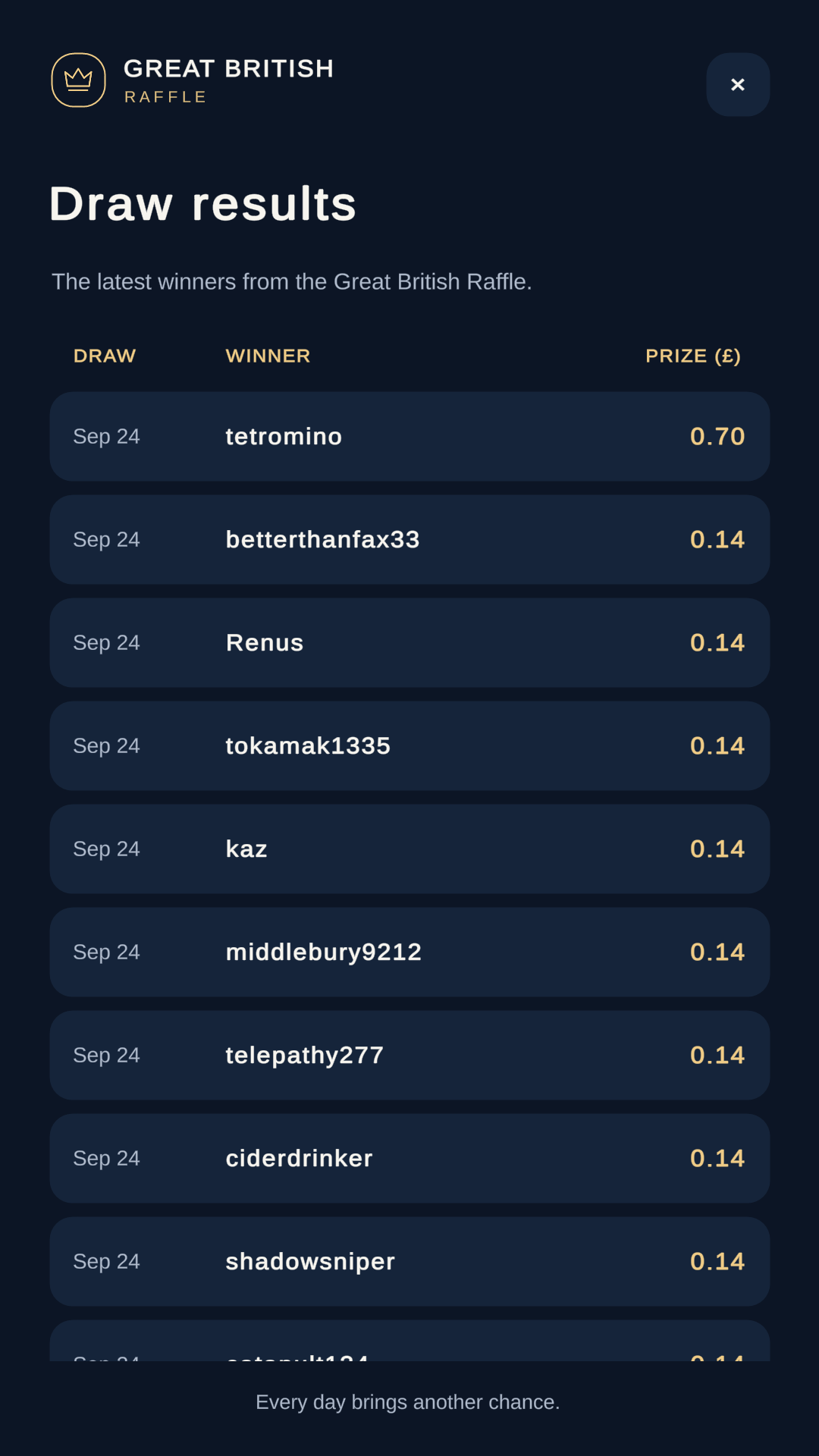
Tap Draw Results at the bottom of the home screen to open the winners list. Each row shows:
- Draw: the date of the draw.
- Winner: the winning player's name.
- Prize (£): the amount awarded.
Scroll to see more results and use the × button to return to the home screen.
When you win, the prize is added to Your Balance. You do not need to claim it from the results list. Allow the draw and balance update to finish before trying to cash out.
The balance is separate from your ticket total: tickets reset each day, while unwithdrawn winnings remain on your account.
Cash Out: Withdrawing Your Winnings
Cash Out becomes available from a £0.10 game balance. The button is disabled below that amount. Final redemption minimums and available rewards can differ by method and region.
- Tap Cash Out beside Your Balance on the home screen, or open the settings cog and use Cash Out under Your Prizes.
- Select Gift Card, PayPal or Crypto from the cash-out choices.
- Wait for the success message before closing the result or submitting another request.
- Complete the final step for your selected method below.
- Gift Card or PayPal: check the email address linked to your Kepithor account for the reward-claim link. Follow that link to choose an available gift card or send the reward to PayPal.
- Crypto: the value is transferred to your Kepithor game balance. Continue at kepithor.com to check that balance and withdraw to a supported wallet.
Cash Out uses your accumulated raffle balance; after a successful request, the raffle balance returns to zero. Make sure you can access your account email before choosing an email-delivered reward. Check the choices and redemption requirements before completing your claim.
Settings and Music
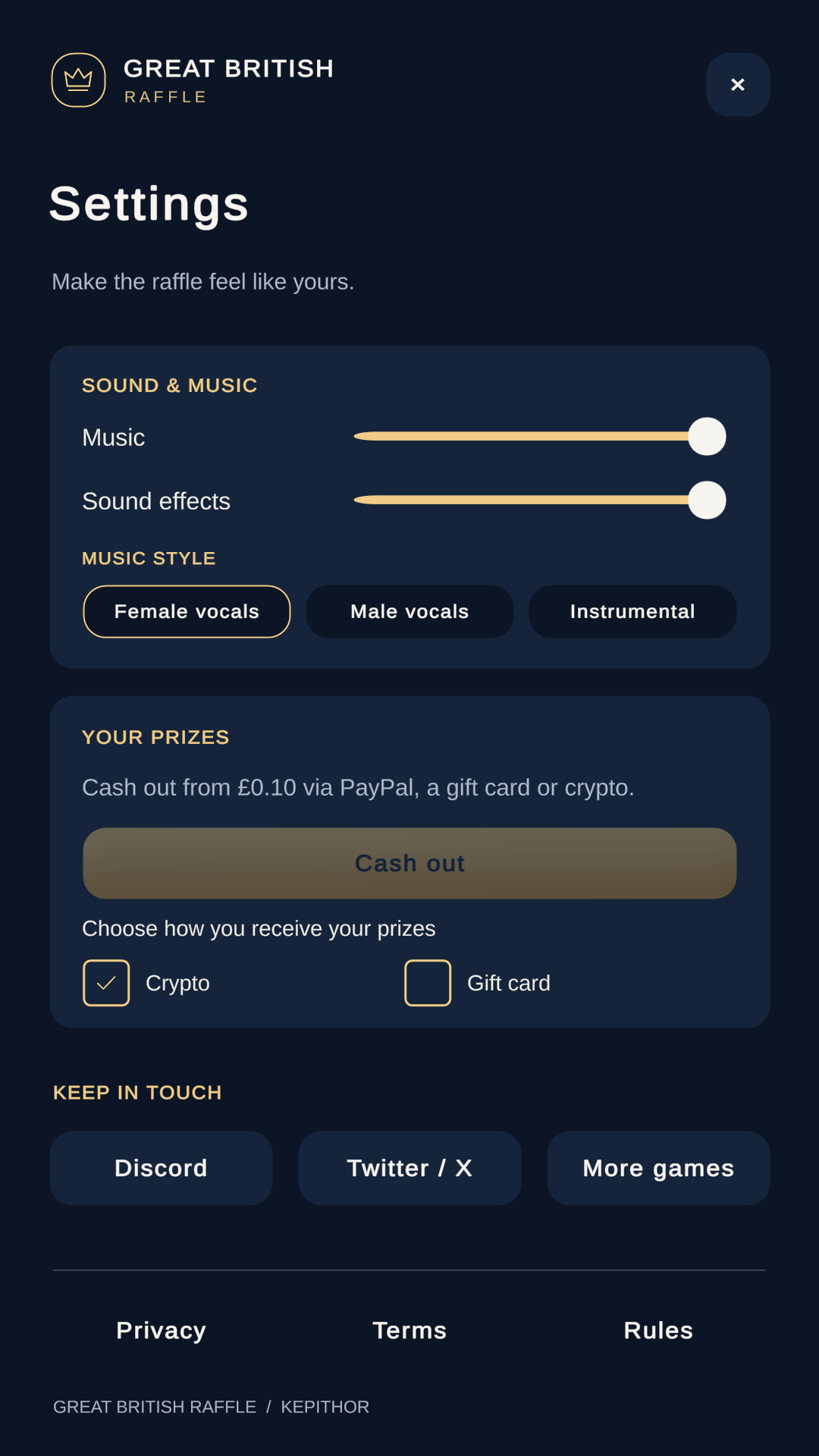
- Music: adjust the music volume independently of sound effects.
- Sound Effects: set the volume of game sounds.
- Music Style: choose Female Vocals, Male Vocals or Instrumental.
- Your Prizes: access Cash Out and the Crypto or Gift Card prize-preference controls.
- Keep in Touch: open Discord, Twitter / X or more Kepithor games.
- Privacy, Terms and Rules: read the app's policies and participation requirements.
The title screen also has separate music and sound controls.
Useful Raffle Tips
- Collect before the deadline. Tickets do not carry over into tomorrow's draw.
- Wait for credit. Let each advert and its ticket confirmation finish before starting another.
- Use the countdown. Midday UTC may not be midday in your local time zone.
- Keep expectations realistic. More tickets improve your chances, but a prize is never guaranteed.
- Keep your account email accessible. Gift Card and PayPal reward claims arrive by email.
- Read the rules. Check eligibility and the available payout options before participating.